

Corporate SSL Interception Breaks AI Coding Telemetry
By wGrow Project Team ·
The IDE shows a green checkmark. Authentication succeeded. The developer starts typing, the autocomplete spinner turns briefly, then vanishes. No error modal, no crash report. Context never syncs, and nothing in the UI admits anything is wrong.
If the corporate proxy inspects TLS and the AI tooling doesn’t trust the proxy, this is what happens.
The silent failure of hardcoded certificate trust
An enterprise proxy such as Zscaler inspects HTTPS by terminating the connection, reading the traffic, and opening a second connection to the real server. To make that work, it hands the client a certificate it minted on the fly, signed by a corporate root CA. Browsers accept it because IT pushed that root CA into the operating system trust store.
AI coding tools don’t all read that store. The GitHub Copilot extension is a good example. The agent that handles completions and context upload runs on a Node.js runtime inside the IDE’s extension host. Node ships with its own bundled list of public root CAs and, by default, never consults the OS keychain. It trusts your corporate root only if you point it there, either through the NODE_EXTRA_CA_CERTS environment variable or through the system-CA option in newer Node versions. Whether that option exists depends on the Node build the vendor ships, and that is not your call.
The result is a strange split on a single laptop. The browser loads github.com without complaint. The Node process behind the IDE sees an unknown issuer and aborts the handshake.
Network teams will bristle at the word “pinning”, so let me be precise. Strictly speaking, this is a private trust store, not pinning to a specific key. For you the effect is the same: a certificate chaining to your corporate root gets rejected, and distributing that root through the OS doesn’t help. The distinction matters only for the remedy. With a private trust store you can sometimes inject your root. With true pinning you can’t. In practice, injecting a root into every embedded runtime on every developer machine is a project in itself, and you repeat it each time a vendor ships a new runtime.
The failure is quiet because of where it lands. Sign-in works. The high-volume calls that carry completions and codebase context are the ones that die, and the tool doesn’t treat a dropped connection as something the user needs to hear about. It retries, gives up, and goes silent.
The futility of the IP whitelisting playbook

When traffic is blocked, network architects reach for the familiar tool: “Send us the IP addresses and we’ll whitelist them.”
That playbook assumes the vendor has a stable address, and AI providers often don’t. Model APIs and coding-agent endpoints typically sit behind global CDNs and edge networks such as Cloudflare or Fastly, which answer from a large, shifting pool of addresses that varies by geography and load. A list compiled on Monday describes Monday. Don’t expect one to stay accurate for long, and don’t count on a vendor committing to one.
So teams pivot to FQDN-based rules, which is the right instinct, and then can walk into a trap. If the rule allows the domain but leaves SSL inspection switched on for it, the traffic routes correctly and policy permits it. It is still decrypted and re-signed with the corporate certificate on the way through, and the embedded runtime still rejects that certificate. The firewall dashboard shows an allowed destination. The developer’s machine shows a dead autocomplete.
These are the worst incidents to debug, because every team can truthfully say its piece is working.
Grounding the failure: when a bank rolls out coding agents
If a team rolls out AI coding agents at a regional bank, the tools can be approved and licensed, with procurement done, and the code-aware features can still fail without any explanation.
The cause is a split that’s easy to miss. OAuth authorization can work. That flow opens the system browser, which trusts the corporate root, so sign-in completes and the IDE shows the user as authenticated. The telemetry and context endpoints, though, are called by the embedded SDK, which does not trust the root. Auth passes and everything after it can fail. That’s why the green checkmark misleads: it proves the browser path works and says nothing about the SDK path.
The same shape can appear in any organisation, whatever its proxy configuration details. Sign-in succeeds, and the code-aware features that justify the licence don’t function. The traffic is routed correctly and inspected anyway.
The bottleneck in such environments is the same. The tools are officially approved but functionally paralysed by a network policy written years before anyone considered this category of software. The approval is given. The egress path to make it work is not.
The inevitable shadow IT: SSH tunnels and residential proxies
So what happens when InfoSec denies the bypass request and the tools stay broken? Developers don’t stop wanting AI assistance. They route around the restriction.
In locked-down environments, a workaround is tempting that should alarm every security architect. Developers can tunnel traffic out through SSH sessions to external hosts and may chain onto residential proxy networks. Codebase telemetry then leaves the corporate network by a path the enterprise neither controls nor sees. The tool works again, and the user is happy.
I don’t mention this as a recommendation. It’s dangerous. Source code and context leave through an anonymous exit with no logging, no data-loss controls, and an unknown operator on the far end. The residential proxy node is run by someone the enterprise has never vetted.
And the irony stings. The inspection appliance was deployed to detect data exfiltration. By refusing to provide a working, sanctioned path for approved tools, the network team creates an unsanctioned one, invisible to the very controls meant to protect the business. When developers route around it, blanket inspection doesn’t reduce risk. It moves the risk somewhere the enterprise can no longer observe.
Re-architecting egress for agentic telemetry
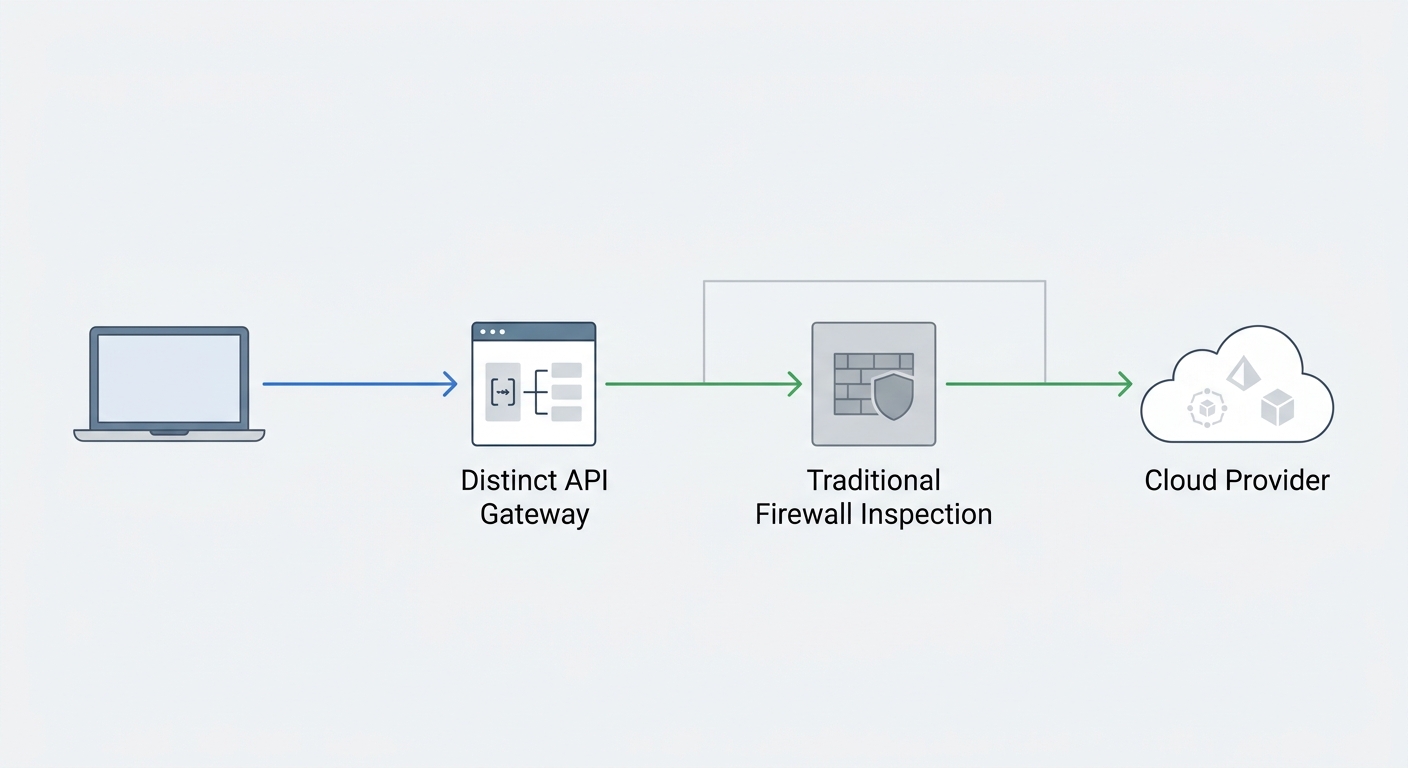
Bending legacy MITM web appliances around every SDK’s trust store is a losing game, because you’ll always be one runtime update behind. The model of “decrypt everything, then trust the endpoint to cooperate” was built for browsers on managed desktops. AI tooling is a different class of client.
There are two defensible fixes.
First, an explicit SSL inspection bypass for named AI telemetry FQDNs. Use hostnames, not IP ranges, which rotate, and not a blanket domain allow with inspection left on. Keep a specific, reviewed list of trusted hostnames exempt from decryption, with the exemption documented and owned. Then pair it with the controls you can still apply without decrypting: destination allow-listing, connection logging, and volume baselines. You lose payload visibility on those flows, but you gain a tool that works and traffic you can still account for. The trade-off is real. A bypassed hostname is only as trustworthy as the vendor behind it, so the list needs a review cadence.
Second, a dedicated outbound AI gateway. Route IDE and agent traffic through an API gateway built for the purpose. The client talks to your gateway, using a certificate your runtimes can be configured to trust deliberately. TLS terminates at that edge, under your control, and the gateway applies policy, redaction, and logging before anything reaches the provider. You inspect on your terms, at one chokepoint, instead of intercepting at every desktop. The catch is client support: the gateway works only for tools that let you override the endpoint or proxy settings, so check that before you commit.
Which one fits depends on how much payload inspection your regulator expects. A bank-like regulated environment leans toward the gateway. A lighter-touch environment can start with the bypass list and move to a gateway later.
What won’t survive is the status quo. Blanket SSL interception on developer workstations is hard to reconcile with agentic development. Either you design a legitimate egress path for these tools, or your developers will design an illegitimate one for you. Build the first before you discover the second.